mechanical-engineering-skills
Tutorial: LLM-3D Print (agent monitors and corrects an FDM print layer by layer)
Skill: llm-3d-print-monitor · Paper: Y. Jadhav, P. Pak, A. Barati Farimani, LLM-3D Print: Large language models to monitor and control 3D printing, Additive Manufacturing 114 (2025) 105027, arXiv:2408.14307 · Code: BaratiLab/LLM-3D-Print…
In LLM-3D Print, a Klipper printer pauses after every layer and parks the head clear of two cameras. A team of agents then works on that layer:
- A vision-language model describes the defects.
- A planner decides what to look up.
- An executor queries Moonraker.
- A solution planner chooses G-code corrections.
- An executor applies them, and the print resumes.
The paper validated failure detection against 14 engineers and showed prints improving over successive layers.
In this skill, the agent you are talking to does the looking and the planning.
printer.py is the executor and supervisor:
- It enforces the paper’s stage order.
- It blocks anything outside a short, bounded allowlist.
- It applies plans all-or-nothing, and only with
--live. - It logs every step.
A mock printer renders camera images from the simulated process state, so you can rehearse the whole loop without hardware.
Use cases
- Babysitting a long print: the agent checks each layer, or every N layers, and makes small corrections instead of letting a defect spread.
- Rescuing a print in progress: under-extrusion from a partial clog, stringing on a humid day, or blobs after a filament change.
- Training and teaching: the session log is a worked record of observation → hypothesis → query → change → evidence.
- Research on closed-loop AM: swap in your own detector, keep the safety gate and the audit trail.
Setup
npx skills add BaratiLab/mechanical-engineering-skills --skill llm-3d-print-monitor
pip install numpy pillow
cd skills/llm-3d-print-monitor
For a real printer:
- Follow
klipper_setup.md: two webcams namedtopandfront,[pause_resume],[firmware_retraction], and aLAYER_INSPECTmacro. - Then post-process the sliced file:
python scripts/add_layer_pauses.py part.gcode part_mon.gcode --every 1On the paper’s own spanner G-code with
--every 2, this found 21 layers from the slicer comments and inserted 10 pauses.
Walkthrough: rescuing an under-extruding print (mock printer)
python scripts/mock_moonraker.py --port 7125 --fault underextrusion &   # hidden partial clog: 82% real flow
export MOONRAKER_URL=http://127.0.0.1:7125
P="python scripts/printer.py --session runs/me_letters"
$P wait && $P snapshot
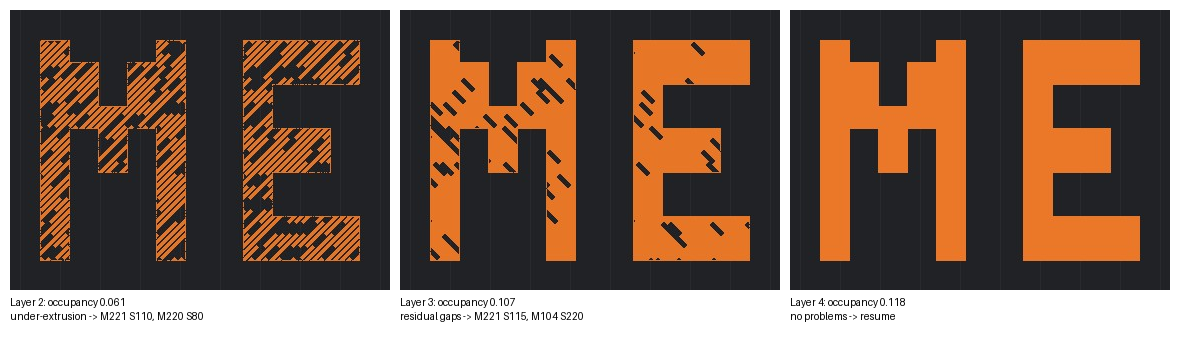
Layer 2. The agent reads top.jpg and front.jpg. The infill lines are broken into
dashes, perimeters have missing segments, and the front view shows a discontinuous layer.
It records this
(d2.json):
$P record detect d2.json            # failures: under-extrusion, rating 4
$P record plan p2.json              # → refused: "gather information before planning a fix"
$P query extruder gcode_move firmware_retraction   # temp at target, flow 100%, speed 100%
$P record plan p2.json              # M221 S110 (+10% flow), M220 S80 (slow to 80%)
$P apply && $P apply --live && $P resume --live
Layer 3. Occupancy rose from 0.061 to 0.107. Short gaps remain. The agent’s first plan
also included SET_GCODE_OFFSET Z_ADJUST=-0.2. The safety gate refused the whole plan,
because the Z step limit is ±0.05 mm, and nothing was sent. The agent resubmitted
M221 S115 and M104 S220.
Layer 4. The infill is solid and occupancy is 0.118. The agent records “No problems found” and resumes without a plan.
$P report prints the audit trail:
## Layer 2
- snapshot: occupancy {'top': 0.0614, 'front': 0.0133}
- detect: Problems found; failures: ['under-extrusion']; rating 4
- query: extruder, gcode_move, firmware_retraction
- apply LIVE: `M221 S110` → sent
- apply LIVE: `M220 S80` → sent
## Layer 3
- apply LIVE: `SET_GCODE_OFFSET Z_ADJUST=-0.2` → BLOCKED: Z_ADJUST must be within ±0.05 mm
- apply LIVE: `M221 S115` → sent
- apply LIVE: `M104 S220` → sent
## Layer 4
- detect: No problems found; rating 9
Why the safety gate is strict
The paper’s own run logs show what happens without one. With four or five changes per layer, the agents pushed speed down to 30%, retraction up to 7 mm, and stacked several Z offsets.
The skill therefore enforces:
- one or two levers per layer;
- caps on each step (flow ±10%, hotend ±15 °C from the start, Z ±0.05 mm per step and ±0.2 mm total);
- a block on motion, homing, firmware and config commands entirely;
- dry-run until you add
--live.
Two more rules:
- If the same fix fails twice, the agent stops and names a likely hardware cause (clog, wet filament) for a person to check.
- Layer shift, spaghetti or a detached part means stop and tell the user.
See playbook.md for the defect → lever table.
Cite: Jadhav, Pak & Barati Farimani, Additive Manufacturing 114 (2025) 105027.